The core model
Each scenario contains conditions and actions. A condition answers "when should this run?" An action answers "what should happen?" The important current UI rule is that each source is bound to an explicit line, so RTU 1, RTU 2, and TCP do not become ambiguous.
flowchart LR
    A[Device channel] --> B[Condition]
    B --> C{Result}
    C -->|no| D[Wait for next evaluation]
    C -->|yes| E[Action]
    C -->|unknown| H[Preserve last trustworthy state]
    H --> D
    E --> F[Device command]
    F --> G[Scenario Log entry]
Scenario fields
| Field | Purpose | Practical advice |
|---|---|---|
| Name | Readable rule name. | Name it by intent: "CO2 high - ventilation boost". |
| Logic | AND requires all conditions, OR requires at least one. | Alarms often use OR; exact combinations usually use AND. |
| Mode | Controls repeat behavior: persistent, one-shot, or multiple. | Use persistent for maintained behavior and one-shot for a single event. |
| Negate | Inverts the condition result. | Use with care: negation makes service review harder. |
| Enabled | Allows or blocks rule execution. | Disable the rule before changing critical actions. |
A missing, stale, offline, or failed condition makes the complete evaluation unknown for AND,
OR, and Negate. Actions are suppressed and prev_state/executed remain unchanged.
Scanner, service, and BLE pauses use the same rule. Recovery compares against the last trustworthy state,
preventing a false edge or a repeated one-shot action.
How to create a useful rule
Scenario Log
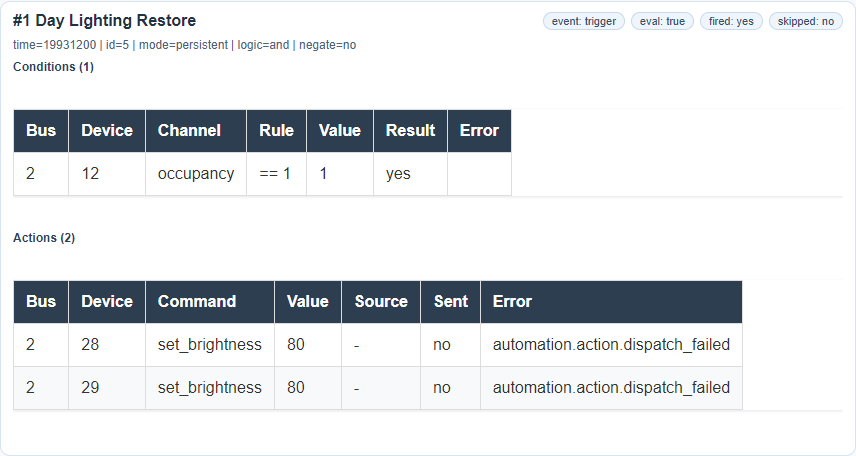
Scenario Log is the main evidence source for automation. If someone says "the rule did not run",
first inspect the log: was the condition true, did the gateway attempt the command,
and was there a route or line availability error? The evaluation_state field and per-condition
states distinguish ordinary false from safe unknown; a continuing unknown does not spam every cycle.
Log overview

Detailed entry
Common mistakes
| Symptom | Likely cause | Check |
|---|---|---|
| The scenario does not trigger. | The condition is not true or the rule is disabled. | Enabled, Logic, threshold, and channel freshness in Control. |
| The condition triggered, but the command did not run. | The device is unavailable, the command is wrong, or the TCP route is ambiguous. | Scenario Log, Control command, TCP tunnel/NAT settings. |
| The rule triggers too often. | The threshold is close to a noisy value or the mode is wrong. | Channel trend, object hysteresis, scenario mode. |
| After device editing, the scenario behaves differently. | A channel or command was renamed or removed. | Setup, Template Formats, and Scenario Log after first run. |