Storage, Modbus Log, and Scenario Log
| Area | Shows | Open it when |
|---|---|---|
| Storage | Configuration files, device profiles, and service data on SPIFFS and SD Card. | You need to verify what is actually stored on the device. |
| Modbus Log | Polling and command history grouped by folder and file. | A device does not respond, values are stale, or a command fails. |
| Scenario Log | Automation execution history. | You need to understand why a rule did or did not run. |
Storage as persisted truth
Storage does not replace Setup, but it lets service engineers see which files are really stored on the device. Use Setup for normal changes. Use Storage for checking, downloading, analysis, and careful service work.
File browser
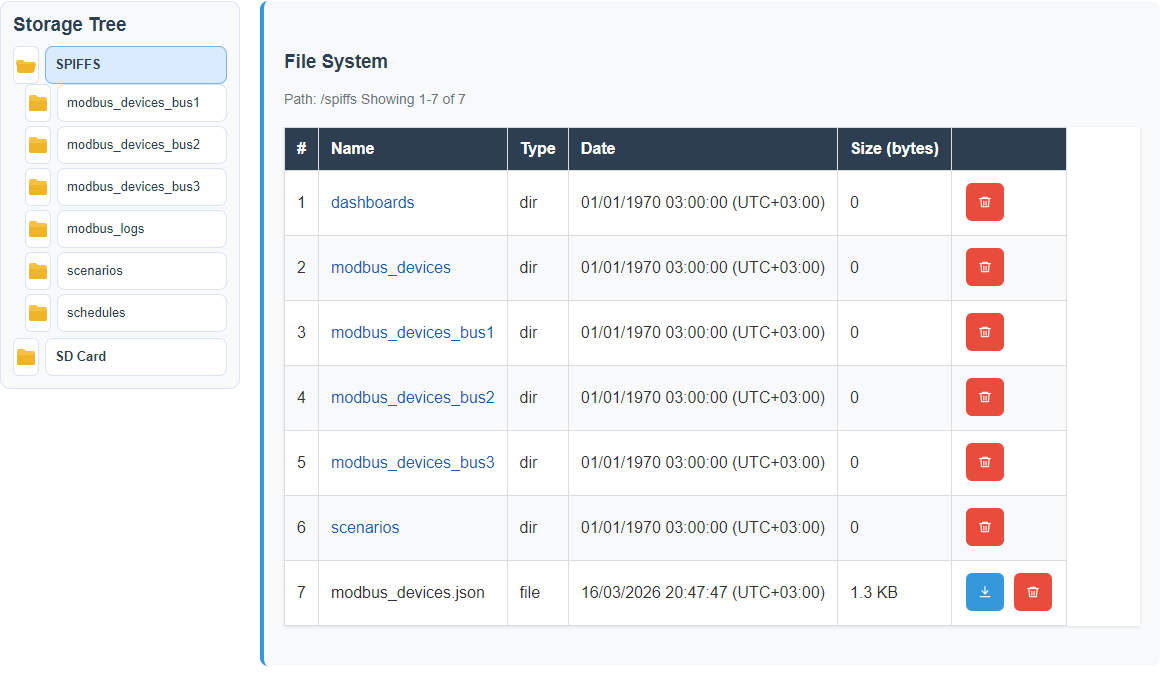
Selected file

SPIFFS and SD Card
| Medium | Role | Notes |
|---|---|---|
| SPIFFS | Internal device storage. | Always available, but limited. Polling logs may rotate by free-space pressure. |
| SD Card | Main place for larger logs and service data when mounted. | Common runtime/event logs are stored only on SD. The write reserve is 1% of capacity clamped to 8–64 MiB and includes the pending write. Under pressure only the oldest completed Modbus day directories inside the owned root may be pruned; the active file and unrelated data remain untouched. |
How to read Modbus Log
The current UI separates folder navigation from file operations: choose the folder or area on the left, then work with files and actions on the right. This makes deep log structures easier to use.
What to collect before support escalation
- Control screenshot with the selected device and visible state.
- Modbus Log file for the affected line and device.
- Scenario Log if automation is involved.
- Settings screenshot showing line mode, MQTT/gateway, and storage state.
- Device configuration files from Storage if the issue survives reboot.
Safe actions
| Action | Use when | Risk |
|---|---|---|
| Download | Before service work, deletion, or sending evidence to support. | Low. Check that the file does not expose secrets. |
| Refresh | After settings changes, reboot, or a long wait. | Low. It may reveal a newer tree state. |
| Delete | Only when the file is not needed or consumes space. | High for configuration. Download first. |
| Edit | For service correction when Setup is not suitable. | High. Invalid JSON can break configuration loading. |
CBOR format: what is inside a file
A polling log is a binary CBOR stream. Do not open it as UTF-8 text:
download the bytes unchanged, then parse them with Workbench or another CBOR-aware tool.
Files use modbus_<id>_<YYYYMMDD_HHMMSS>[_suffix].cbor names.
| Element | Field | Meaning |
|---|---|---|
| Header | h | Ordered channel-name array. |
| Record | t | Measurement timestamp. |
| Record | id | Modbus device ID. |
| Record | v | Values in header order; the reader also accepts the older map form. |
Download CBOR with Agent Tool
python gateway_agent_tool.py list-modbus-logs --storage auto --path "" --max 500
python gateway_agent_tool.py download-modbus-log --storage auto --file "<relative/path/modbus_137_YYYYMMDD_HHMMSS.cbor>" --output .\modbus_137.cbor- If the response says
truncated:true, narrow--pathinstead of making an unbounded request. - Do not use an absolute path or
... The Tool will not replace a local file without--overwrite. - Check
/api/system/usagefor active storage, reserve, storage pressure, and drop/no-space counters. - Do not commit raw customer logs; retain only an approved, redacted summary.
Rotation and storage pressure
Files rotate at a bounded size. Under pressure, retention may select only the oldest completed directories inside the owned Modbus log root. It must not remove the current file or unrelated data. If reserve cannot be recovered, status must show storage pressure and dropped writes rather than reporting successful persistence.