The main rule
The gateway should still remain useful even if the outside world disappears. If the internet is down, an MQTT server is unavailable, or an external Modbus TCP client stops responding, the gateway should still keep polling local devices, showing values in the local web interface, storing configuration, and running local scenarios.
When integrations are actually needed
External integrations are enabled for a clear purpose, for example:
- telemetry must be sent to UMEC Space IoT Cloud or another higher-level system;
- commands must come not only from the local browser but also from outside software;
- RTU devices must become reachable over the network.
If there is no such task yet, integrations can stay disabled during the first stage of setup.
Primary platform path
For maximum impact, use UMEC_SPACE mode: the gateway brings local Modbus devices into
UMEC Space IoT Cloud Platform, where they can be shown on dashboards,
exposed in mobile applications, used in alerts, notifications, remote control, and further integrations.
Customer sign-up, gateway checks, and model uploads happen in UMEC Space Dashboard;
mobile access uses UMEC Home or
UMEC Business.
Generic MQTT and Modbus TCP remain important integration options, but UMEC Space is the native product path when the site should become part of the UMEC platform rather than only a local Modbus gateway.
Generic MQTT in practical terms
Generic MQTT is the mode in which the gateway connects to an outside MQTT server and starts sending messages there. Usually this is used to send current values, device states, and service telemetry to another system.
In very simple terms, the gateway becomes a sender of information for a cloud, SCADA, or integrator platform.
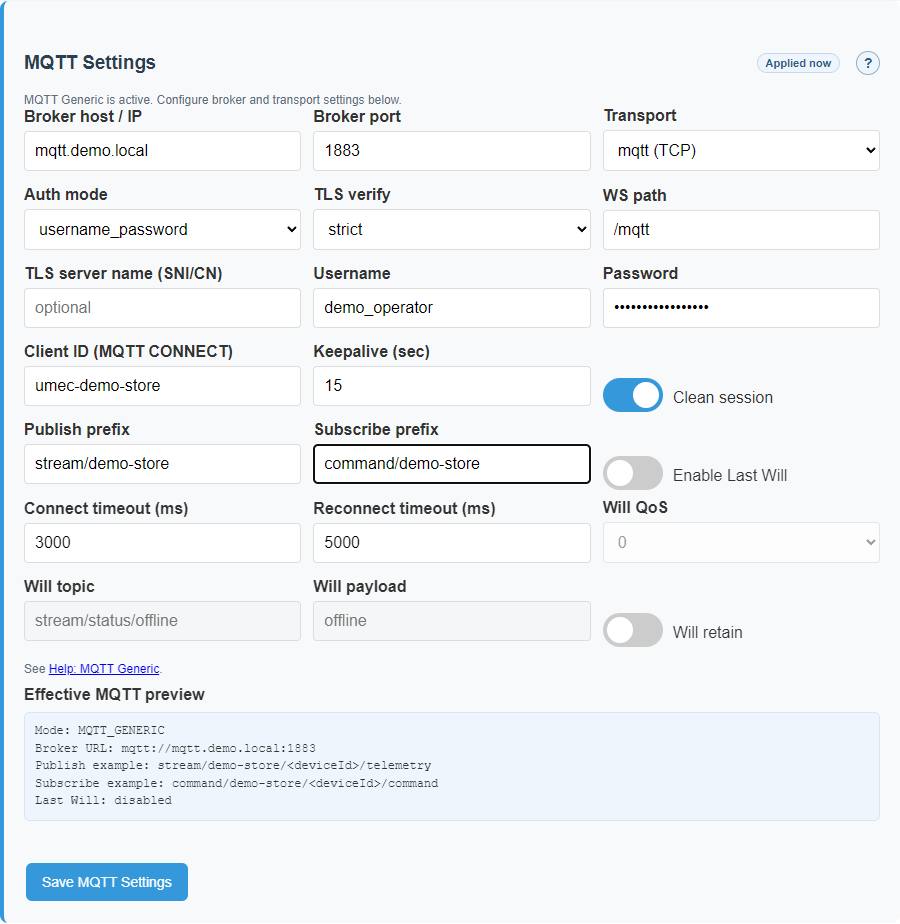
Server address
This is the address of the MQTT server the gateway should connect to. Without it, there is nowhere to send data.
Username and password
These are needed if the server does not allow anonymous access. If authentication is enabled on the server, the values must be correct.
Secure connection
If the site requires encrypted communication, a protected connection type is used. This reduces the risk of traffic interception.
flowchart TD
    A[MQTT Generic mode is selected] --> B[The operator fills in connection settings]
    B --> C{Are the required settings valid?}
    C -- No --> D[The gateway does not apply a broken configuration]
    C -- Yes --> E[The gateway connects to the MQTT server]
    E --> F[The gateway publishes telemetry]
    E --> G[It can receive commands if allowed]
    E --> H[It reconnects after communication loss]
Why the password is not shown back in plain text
If a password has already been saved, the system should not reveal it openly every time someone reads the settings page. Otherwise any person with screen access would immediately obtain secret credentials.
That is why the interface usually shows that a password exists without displaying the actual value.
What Modbus gateway means
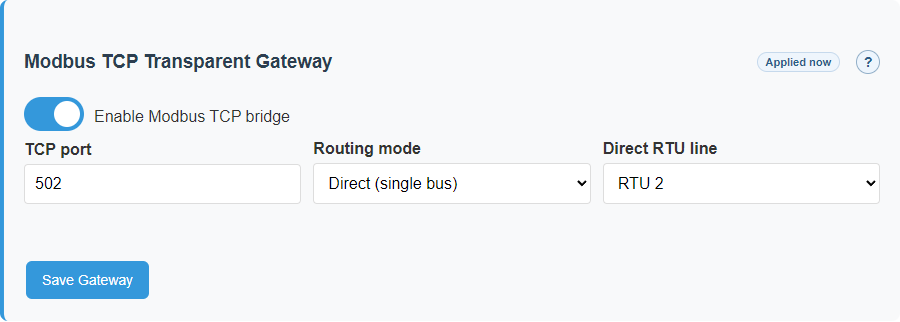
Modbus Gateway is used when another system needs to reach your RTU devices over the network. In that case the gateway accepts a network request, forwards it to the correct internal line, waits for the field device response, and then sends the reply back to the outside system.
The easiest way to understand it is this: the gateway becomes a translator between Ethernet networking and local Modbus lines.
Direct mode
All outside requests are sent to one selected line. This is the easiest option when only one Modbus segment needs to be exposed.
Strict-map mode
Each device address is assigned to a specific line in advance. This is useful when several lines are in use.
Access limits
You can limit who connects, through which interface, how many clients are allowed at once, and which device addresses may be reached.
What the main gateway settings really mean
Bind interfacemeans which network interface should accept outside connections: Ethernet only, Wi-Fi only, or both.Max clientsmeans how many outside clients may stay connected at the same time. This protects the gateway from overload.Idle timeoutmeans how long an inactive connection may remain open before the gateway closes it automatically.Unit-id whitelistmeans which device addresses may be reached from outside. This is useful when only part of the site should be exposed externally.
In plain language, these settings answer four practical questions: from where to allow access, how many simultaneous connections to allow, how long to keep a silent connection alive, and which devices may actually be reached.
flowchart LR
    A[Outside system] --> B[The gateway receives a Modbus TCP request]
    B --> C{Which routing mode is selected?}
    C -- Direct --> D[The request goes to one selected line]
    C -- Strict-map --> E[The gateway checks the routing table]
    E --> F[The request goes to the correct line]
    D --> G[The gateway talks to the field device]
    F --> G
    G --> H[The reply returns to the outside system]
How gateway relates to automation
The user does not need to know internal firmware details, but one principle is important: commands should move through the system in a clear and predictable way.
It should not happen that an operator command uses one hidden path, a local scenario uses a second one, and an outside request uses a third special path. If that happens, the system becomes hard to understand and hard to support.
A good control system stays explainable. If a device is available, the command behaves predictably. If it is unavailable, the gateway should show a clear error instead of creating the impression that everything worked.
When it is really time to enable integrations
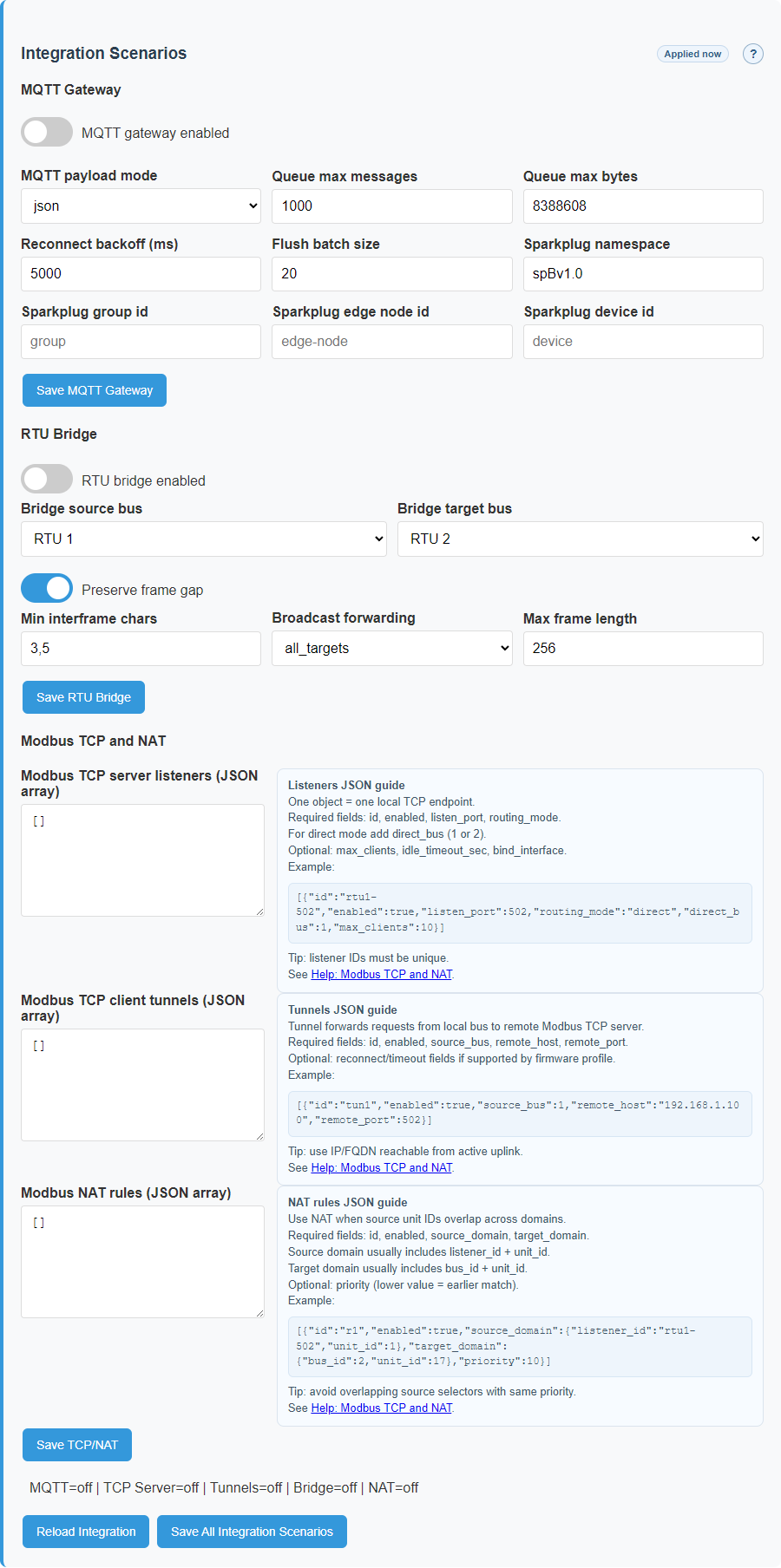
- After local operation is already proven: devices are visible, values update, commands work, and the local web interface is stable.
- After the operator understands the current device mode: which operating mode is selected, whether the outside path is active, and what the current machine-state means.
- After there is a clear decision about what data should leave the controller, who will receive it, and which outside commands are actually allowed on the site.
One of the most common mistakes is enabling MQTT or gateway too early, before line setup and device inventory are fully validated. In that situation integration does not help. It only makes troubleshooting harder.
Settings examples
These examples show the parts of Settings that matter when the gateway starts talking to outside systems.
MQTT settings
Modbus gateway modes
Machine-state confirmation
Related reference pages
- UI Reference for settings and mode-dependent screen behavior.
- Template Formats for integration-visible payload details.
- Maintenance for safe service actions when integration changes require a restart.
One MQTT threshold policy
mqtt_threshold and mqtt_force_interval_min belong to the source channel/point,
not to one MQTT provider. Generic MQTT and UMEC therefore share one publish-admission decision: switching
mode must neither filter twice nor emit every unchanged sample.
| Setting | Publish condition | Evidence |
|---|---|---|
mqtt_threshold | Change reaches the configured magnitude. | Small fluctuations produce no message in either Generic or UMEC. |
mqtt_force_interval_min | The confirmation interval expires. | A stable value is still confirmed periodically. |
| Reconnect | According to bounded fresh-snapshot rules. | Recovery does not create an endless duplicate stream. |
Gateway-to-gateway tunnel over mDNS
A TCP tunnel accepts IPv4 or umec-<short-id>.local. Scan on the client gateway runs its own
mDNS browse and lists compatible peers. Selecting a peer only fills the draft hostname; save and activation
remain explicit operations.
- Enable the bridge on the remote gateway and verify port
502. - Find the peer on the client gateway, select its hostname, and save the tunnel.
- Verify connection state, then freshness for the TCP device channels.
- If mDNS fails, check that both devices share the LAN/VLAN and multicast path; use IPv4 temporarily for diagnosis.